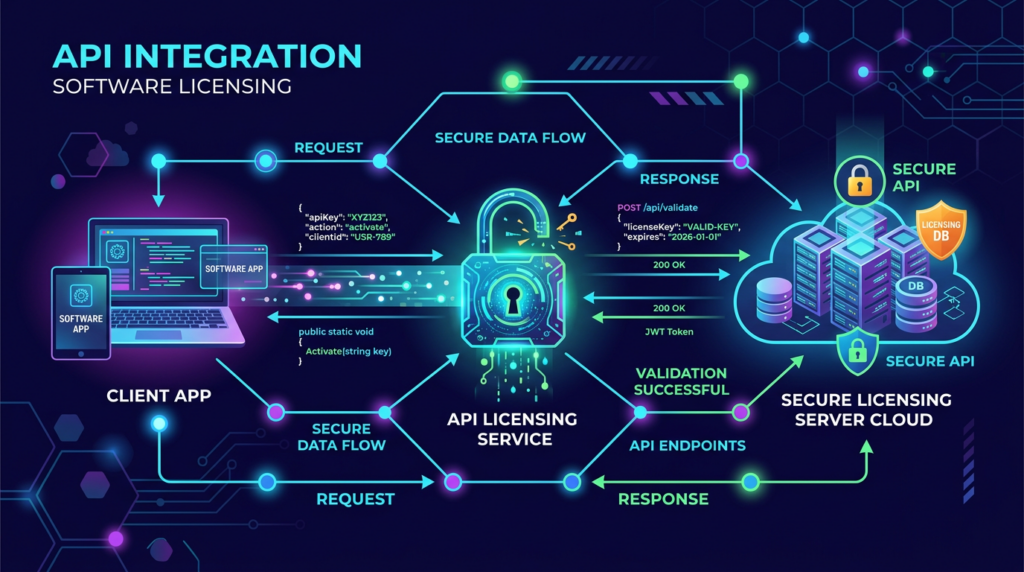
当你搭建好了一个专业的软件销售网站,并配置了自动发卡系统后,接下来的核心挑战是:客户端软件(如 Windows 桌面程序、Mac 应用、Python 脚本等)如何与网站的授权中心进行通信,实现安全的在线激活?
本文将以 柠檬软件销售系统(Softsell) 提供的 REST API 为例,详细讲解客户端接入授权 API 的最佳实践,并提供主流开发语言(C#、Java、Python)的参考代码。
一、 在线激活的核心逻辑
在线激活的本质,是客户端向服务器证明“我是合法的用户”,服务器验证通过后,扣除一个授权名额,并返回授权的有效期等信息。其基本流程如下:
- 提取硬件特征:客户端启动时,提取所在设备的唯一标识(如 CPU 序列号 + 硬盘序列号的 SHA256 哈希值),作为
client_id。 - 输入授权码:用户在软件的激活界面,输入购买后收到的
license_key。 - 发起激活请求:客户端向服务器的
/v1/license/activate接口发送包含client_id和license_key的 POST 请求。 - 服务器校验并绑定:服务器验证授权码是否有效、是否过期、激活数是否超限。如果验证通过,将
client_id与该授权码绑定。 - 本地安全存储:客户端接收到“激活成功”的响应后,将授权信息加密存储在本地。此后每次启动,先读取本地缓存,并定期(如每 24 小时)向服务器发送
check请求以更新状态。
二、 C# (WPF/WinForms) 接入示例
在 Windows 桌面开发中,C# 是最常用的语言。你可以使用 HttpClient 来发送请求。
using System;
using System.Net.Http;
using System.Text;
using System.Threading.Tasks;
using System.Text.Json; // 推荐使用 System.Text.Json

public class LicenseManager
{
    private static readonly HttpClient client = new HttpClient();
    private const string ApiUrl = "https://your-domain.com/wp-json/softsell/v1/license/activate";

    public async Task<bool> ActivateLicenseAsync(string licenseKey, string clientId)
    {
        var payload = new
        {
            license_key = licenseKey,
            client_id = clientId,
            device_name = Environment.MachineName // 获取计算机名作为设备名称
        };

        var content = new StringContent(JsonSerializer.Serialize(payload), Encoding.UTF8, "application/json");

        try
        {
            HttpResponseMessage response = await client.PostAsync(ApiUrl, content);
            response.EnsureSuccessStatusCode();

            string responseBody = await response.Content.ReadAsStringAsync();
            var result = JsonSerializer.Deserialize<JsonElement>(responseBody);

            bool isSuccess = result.GetProperty("success").GetBoolean();
            if (isSuccess)
            {
                // 激活成功,解析有效期并加密保存到本地注册表或文件中
                string expireDate = result.GetProperty("license_info").GetProperty("expire_date").GetString();
                Console.WriteLine($"激活成功!到期时间:{expireDate}");
                return true;
            }
            else
            {
                string errorMsg = result.GetProperty("error_message").GetString();
                Console.WriteLine($"激活失败:{errorMsg}");
                return false;
            }
        }
        catch (HttpRequestException e)
        {
            Console.WriteLine($"网络请求异常: {e.Message}");
            return false;
        }
    }
}
三、 Java (Spring Boot/Swing/JavaFX) 接入示例
在 Java 开发中,可以使用 OkHttp 或原生的 HttpURLConnection 来发送请求。以下使用 OkHttp 和 Gson 库:
import okhttp3.*;
import com.google.gson.Gson;
import com.google.gson.JsonObject;
import java.io.IOException;

public class LicenseClient {
    private static final String API_URL = "https://your-domain.com/wp-json/softsell/v1/license/activate";
    private static final OkHttpClient client = new OkHttpClient();
    private static final Gson gson = new Gson();

    public static boolean activate(String licenseKey, String clientId) {
        JsonObject jsonParam = new JsonObject();
        jsonParam.addProperty("license_key", licenseKey);
        jsonParam.addProperty("client_id", clientId);
        jsonParam.addProperty("device_name", System.getProperty("user.name") + " 的电脑");

        RequestBody body = RequestBody.create(
            jsonParam.toString(),
            MediaType.parse("application/json; charset=utf-8")
        );

        Request request = new Request.Builder()
            .url(API_URL)
            .post(body)
            .build();

        try (Response response = client.newCall(request).execute()) {
            if (!response.isSuccessful()) {
                System.out.println("请求失败码:" + response.code());
                // 建议根据 HTTP 状态码(400, 401, 500 等)和响应体中的 error_code 进行详细处理
                return false;
            }

            String responseData = response.body().string();
            JsonObject result = gson.fromJson(responseData, JsonObject.class);

            if (result.get("success").getAsBoolean()) {
                System.out.println("激活成功!");
                return true;
            } else {
                System.out.println("激活失败:" + result.get("error_message").getAsString());
                return false;
            }
        } catch (IOException e) {
            e.printStackTrace();
            return false;
        }
    }
}
四、 Python (PyQt/Tkinter/CLI) 接入示例
对于 Python 开发者,使用 requests 库能够以极简的代码完成接入:
import requests
import socket
import hashlib
import platform

# 假设这里有一个提取硬件特征的函数
def get_hardware_id():
    raw_info = platform.node() + platform.processor() + platform.machine()
    return hashlib.sha256(raw_info.encode()).hexdigest()

def activate_license(license_key):
    api_url = "https://your-domain.com/wp-json/softsell/v1/license/activate"
    client_id = get_hardware_id()

    payload = {
        "license_key": license_key,
        "client_id": client_id,
        "device_name": socket.gethostname()
    }

    headers = {"Content-Type": "application/json"}

    try:
        response = requests.post(api_url, json=payload, headers=headers, timeout=10)
        # 注意处理 4xx 和 5xx 等错误状态码
        if response.status_code == 200:
            result = response.json()
            if result.get("success"):
                expire_date = result.get("license_info", {}).get("expire_date")
                print(f"激活成功!授权到期时间:{expire_date}")
                return True
            else:
                error_msg = result.get("error_message", "未知错误")
                print(f"激活失败:{error_msg}")
                return False
        else:
            # 解析非 200 状态码时的 JSON 错误信息
            try:
                error_data = response.json()
                print(f"请求被拒绝:{error_data.get('error_message')}")
            except ValueError:
                print(f"服务器错误,状态码:{response.status_code}")
            return False

    except requests.exceptions.RequestException as e:
        print(f"网络异常:{e}")
        return False

# 测试调用
# activate_license("ABCD-1234-EFGH-5678")
五、 最佳实践与安全性建议
在接入 API 时,单纯的代码调用是不够的,你还需要考虑以下架构和安全性问题:
- 强制使用 HTTPS:所有 API 请求必须通过 HTTPS 进行,防止中间人攻击(MITM)窃取授权码。在极高安全要求的场景下,建议使用证书锁定(Certificate Pinning)。
- 安全的本地存储:不要将“已激活=True”这种简单的明文状态保存在本地文件或注册表中,否则用户篡改后即可破解。应该将服务器返回的带签名的数据加密存储(如使用 Windows DPAPI 或 Mac Keychain),并在运行时解密校验。
- 网络超时与宽限期设计:如果用户的网络暂时断开,导致
check接口调用失败,不要立刻退出软件。建议设计一个“7天宽限期”:只要本地缓存的授权未过期,允许在网络异常的情况下继续使用,避免误伤正版用户。
六、 总结
通过本文的示例,你可以看到客户端接入在线验证 API 并不复杂。核心在于通过稳定可靠的手段提取设备的唯一标识(client_id),并与柠檬系统提供的标准化 REST API 进行通信。
柠檬软件销售系统(Lemon Softsell)为你屏蔽了服务端复杂的发卡、并发控制、数据库管理逻辑。你只需在客户端写下几十行代码,就能让你的软件拥有媲美大厂的商业级授权验证能力。现在,就为你的下一款爆款软件加上坚固的安全锁吧!
读到这里,不如自己验证一次
文章里的逻辑,你可以在青柠量化里用真实数据重新跑一遍。免费,零代码。